Challenge

How might we inspire and transform Keystone users transaction Experiences, so that the value of this offering justifies the need for their continuous partnership?

My Role
UX Design, Research, Interaction Design, Prototyping, Visual Design

Year
2022

Tools
Figma, Principle

Learning about our users

I went through the application reviews on the Google Play Store and Apple App Store to see if users faced similar problems, and yes they did. Afterward, I conducted some quick interviews with other Keystone customers to gather information on the issues they have with the Keystone Mobile app and suggestions for how to make it simpler for them to use.

Ideation, Design & Prototypes

I sketched out a number of different interaction model concepts  iOS and Android. Along with final visual design, I built prototypes in Principle for Mobile. These helped demonstrate how interactions looked and felt, and were also a resource for potential engineers.

Results

Problem

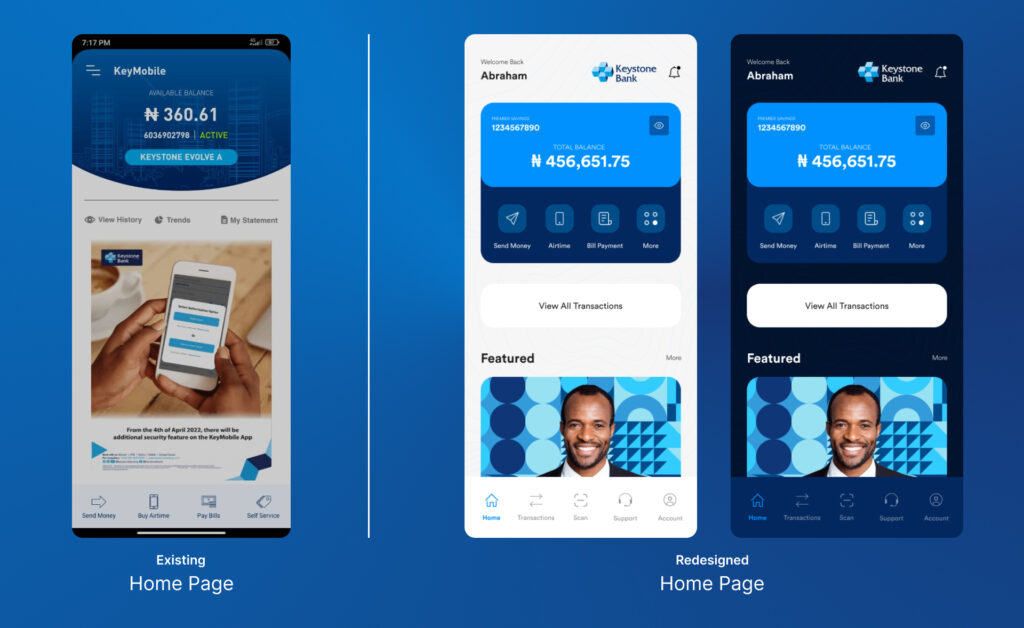
  • Quite busy with a distracting background

Solution

  • Changed the visual hierarchy of information so that it’s easier for users to easily figure out actions to take.

Problem

  • Visually, the interface looks quite outdated when compared to modern mobile designs, starting from the use of colors down to the hierarchy of information.
  • The banks featured ad took the bulk of the home screen, deviating the user’s attention from the main purpose of using the application; to make transactions.
  • There are no quick links to make it easier for users to perform primary actions once they get on board.

Solution

  • Removed all the unnecessary information, arranged the information hierarchy so a user doesn’t get confused by a busy interface.
  • The home page isn’t meant to display bank’s ad because that is not the major reason a user visits the app. According to research, 80% of users visit to perform transactions and some view transactions history to check or send a digital receipt. To cut it short, a user only has quick links/buttons to perform primary actions and also to show recent transactions and an easy to use navigation pane at the bottom

Problem

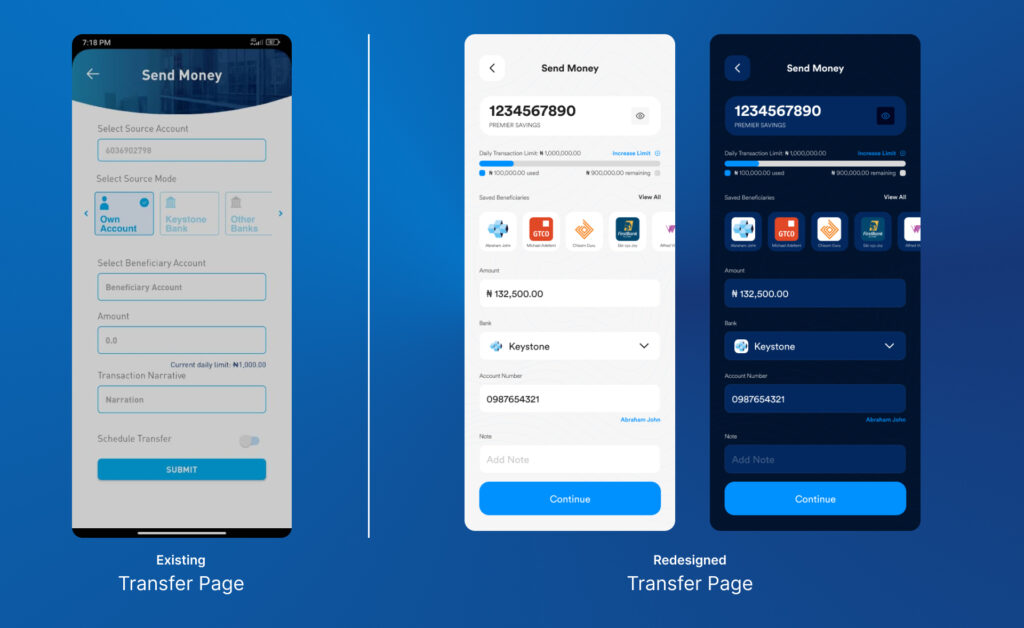
  • There’s an absence of list of saved beneficiaries
  • More so, users don’t have the ability to view from all the lists of banks all at once but are allowed to view about 5 different banks per pop up.

Solution

  • The redesigned screen contains a clean interface, with the top either showing the account details or account balance and also the daily transaction limit and the amount that has been used for that day
  • It also contains the list of saved beneficiaries that auto-fills up the necessary fields
  • It also shows the account name right after filling in the bank name and account number

Conclusion

The aim of this redesign is to improve the user experience and interface. I think I did my best to design a change that would benefit Keystone Bank customers more. I chose a few key screens to focus on, even if some screens were left off. I want to think the ones you’ve already seen communicate the concept well enough. I hope you enjoyed reading this.

Lessons Learnt: I decided to work on this project after an actual experience with the application and seeing that other people also had same experiences which made me realise that there’s ways room for improvement, room to get better and to bring positive change around you.